

Ribbon and Label Mismatch: Why Barcodes Fail to Scan
A ribbon that transfers poorly leaves gaps in the bar. How to check compatibility between ribbon, label and printer before the next order.
In the sorting assembly lines of e-commerce warehouses and production workshops, label printing issues occur almost daily: "Despite choosing scratch-resistant full resin ribbons, the print head wears out after just a few rolls," "Label paper always skews and jams, and repeated adjustments have no effect," "Barcodes print blurry and indistinct, and scanners fail to recognize them even after multiple attempts." Many people's first reaction is that the printer is malfunctioning, but repeated repairs only address the symptoms and not the root cause. Little do they know that the root of these problems has never been the machine itself, but rather the misalignment of the "iron triangle" of labels, ribbons, and printers - this is the "compatibility mysticism" that plagues countless practitioners. It not only slows down production efficiency but also results in a dual waste of ribbons, labels, and print heads, accumulating over time and causing significant cost losses.
Having been engaged in label operation and technical services for many years, we have seen too many cases of pitfalls caused by compatibility errors: some factories blindly follow the trend and choose full-resin ribbons in pursuit of barcode scratch resistance, only to see a sharp decrease in print head lifespan and blurred barcodes, which in turn affect product traceability; some e-commerce warehouses frequently encounter label misalignment and double-sheet adhesion, attributing these issues to damaged printer gears and incurring significant maintenance costs, yet the problems persist. In fact, by 2026, label printing had long moved away from the extensive model of "random matching" and become a precise material science. The compatibility between ribbons and labels directly determines 80% of the print failure rate. Choosing the right combination and adjusting the parameters can solve compatibility issues at their root and eliminate consumable waste.
With the widespread adoption of high-speed labeling machines, achieving a labeling speed exceeding 200 meters per minute has become a common practice in the industry. This has raised higher demands on the strength of label backing paper and the transfer rate of thermal transfer ribbon. Insufficient strength of label backing paper can lead to breakage and stretching deformation under high-speed pulling, resulting in paper disorder. Insufficient transfer rate of thermal transfer ribbon can cause barcodes to appear blurry and ink to delaminate, affecting scanning efficiency and resulting in consumable waste. Essentially, these issues stem from "compatibility" issues - labels of different surface materials, thermal transfer ribbons of different types, and printers of different models all have clear adaptation logic. Violating this logic will only lead to a vicious cycle of "the more you use, the more you waste.".
Drawing from frontline operational experience, we have dissected the two most common compatibility misconceptions in the industry, elucidated the underlying logic through real-life cases, and provided practical solutions that can be directly implemented. Our aim is to assist you in overcoming the mysteries of compatibility, avoiding detours, and saving costs.
The most prevalent misconception is that "all-resin ribbons are inherently superior, and scratch resistance is all that matters." Many practitioners implicitly assume that the stronger the scratch resistance of a ribbon, the better, blindly pursuing all-resin ribbons while neglecting their core prerequisite for compatibility. In reality, the key to selecting a ribbon lies in "matching the label material," rather than solely focusing on scratch resistance. Different types of ribbons exhibit distinct compatibility scenarios and performance differences, and blindly matching them can only lead to counterproductive results.
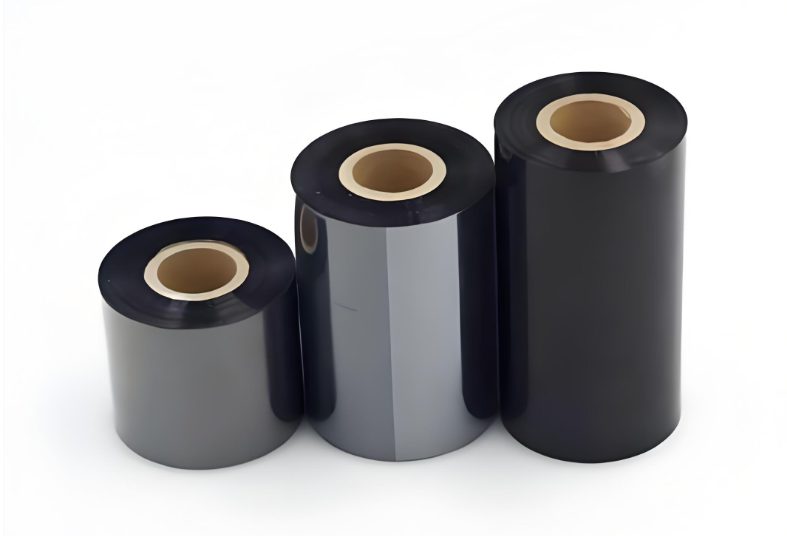
The advantages of full resin ribbons are quite prominent, being resistant to scratching, solvents, and high temperatures, making them suitable for scenarios where high durability of barcodes is required. However, their shortcomings are equally evident - they require extremely high printing temperatures and pressures to achieve perfect transfer, and have stringent requirements for the heat resistance of the label surface material. If your label surface material is a thin film such as PVC that is not resistant to high temperatures, forcibly using a full resin ribbon will result in two fatal issues: Firstly, insufficient temperature will prevent the resin from melting fully, leading to faint barcodes, burrs on font edges, and difficulty in being recognized by scanning guns; secondly, excessively high temperatures and pressures will directly wear down the print head, significantly shortening its lifespan and conversely increasing equipment replacement costs.
Thermal transfer ribbons are primarily categorized into three types: wax-based, hybrid-based, and fully resin-based. The compatibility logic among these three types is clear: wax-based thermal transfer ribbons are the most economical and affordable, suitable for regular copperplate paper, offering clear printing and low cost. However, they have a disadvantage of poor scratch resistance and are prone to smearing, making them suitable for scenarios where barcode durability is not a special requirement. Hybrid-based thermal transfer ribbons fall between wax-based and fully resin-based, offering better scratch resistance than wax-based ribbons and a lower price than fully resin-based ones. They have the widest compatibility and can be used with various surface materials such as copperplate paper, synthetic paper, and PVC, making them the optimal choice for most scenarios. Fully resin-based thermal transfer ribbons are scratch-resistant, solvent-resistant, and high-temperature resistant, but they are the most expensive. They are more suitable for high-temperature resistant surface materials such as PET and synthetic paper, and are not suitable for low-temperature sensitive films such as PVC.
The practical case of a new energy battery factory is of great reference value and represents a common pitfall scenario faced by many factories. When producing quality certification labels, the factory blindly chose a full resin ribbon paired with PVC film labels to ensure that the labels would not be scratched during transportation and storage. After a period of use, it was found that the lifespan of the print head had dropped sharply from the normal 30 kilometers to 5 kilometers, significantly increasing the cost of replacing the print head. More troublesomely, the barcodes on the labels showed obvious "burrs," reducing the recognition rate of the scanning gun to less than 60%. This seriously impacted production efficiency and product traceability, and even posed compliance risks.
After multiple rounds of testing and adjustments, the technical team came up with a targeted solution: switching to a mixed-base ribbon (Wax/Resin) paired with high-gloss copperplate paper labels. The mixed-base ribbon achieves high-density transfer printing at moderate temperatures without requiring excessive heat or pressure. This not only ensures the sharpness of the barcodes, boosting the scanning recognition rate to over 99%, but also prevents excessive wear on the print head, extending the lifespan of the equipment. Additionally, the mixed-base ribbon is less expensive than full-resin ribbons. Overall, the factory has seen a 20% reduction in the comprehensive cost of label printing. This comprehensive solution has completely resolved the compatibility issue and reduced consumable waste.
The second common misconception is that "if the label doesn't feed smoothly or gets stuck, it must be because the printer gears are broken." In practical operations, over 80% of paper feeding issues stem from static electricity and insufficient strength of the label backing paper, rather than machine malfunctions. Many people blindly repair the printer, only to waste time and resources. Especially during dry autumn and winter seasons, or when the high-speed labeling machine is operating, friction between the label and backing paper, as well as machine components, can generate static electricity. This static electricity can cause multiple labels to adhere together, resulting in the "double label" phenomenon, which can lead to label disorder and paper jams. Furthermore, if the backing paper is not strong enough, it can stretch and deform during high-speed pulling, causing the label to deviate and misalign, ultimately affecting labeling efficiency.
In response to this issue, we have combined our frontline operational experience to summarize solutions across three dimensions: materials, equipment, and parameters. These solutions are simple and easy to operate, suitable for direct implementation by frontline operators, and can be mastered without requiring any professional technical background.
On the material side, it is preferred to use base paper labels with an anti-static coating. This type of label base paper has undergone special anti-static treatment, which can effectively discharge static electricity generated by friction, preventing label adhesion. At the same time, high-quality base paper has higher strength, is less prone to stretching and deformation, and is suitable for high-speed labeling scenarios, reducing paper feeding issues from the source. On the equipment side, an electrostatic eliminator can be installed on the printer, especially during dry seasons or high-speed production scenarios, to further reduce electrostatic interference and improve paper feeding stability. On the parameter side, the core is to adjust the printer's "peeling force" and platen roller pressure. Many frontline operators are unaware that the platen roller pressure is adjustable. Too much pressure can cause the base paper to stretch and deform, leading to label misalignment; too little pressure can prevent the printer sensor from accurately recognizing label spacing, resulting in paper feeding disorder.
Here is a practical golden rule to share, which can be directly applied once noted down: When adjusting the pressure of the paper pressing rod, aim for a level that "just takes away the label but allows the backing paper to be easily peeled off". Typically, the most appropriate pressure is one where the backing paper can be gently pulled with a finger, and the label does not shift or wrinkle. Many factories have resolved 80% of paper feeding issues by adjusting this simple parameter, eliminating the need for frequent printer maintenance and saving considerable time and repair costs.
In addition to compatibility debugging during use, negligence in the procurement process can also easily lead to subsequent "compatibility mysticism". Many practitioners, when purchasing labels and ribbons, only focus on price and fail to provide key parameters to suppliers, resulting in suppliers being unable to accurately match the requirements. Consequently, the purchased consumables cannot be used normally, either due to unclear printing or paper feeding issues, ultimately leading to waste of consumables and loss of efficiency.
Drawing from practical procurement experience in the industry, we have compiled a checklist of essential information for procurement. By providing this information to suppliers during the next procurement, compatibility issues can be effectively avoided, consumable waste reduced, and accurate matching of suitable labels and ribbons achieved. Firstly, the printer model, such as Zebra ZT411 or TSC TTP-244, is crucial. Different printer models have varying print head specifications, pressure ranges, and paper feeding accuracy, which in turn affect the compatibility of labels and ribbons. Specifying the model allows suppliers to accurately match the requirements. Secondly, the print head material is another consideration. Ceramic print heads and thin-film print heads differ in terms of high temperature resistance and wear resistance. The printing methods of Flat head (flat pressure) and Near edge (edge pressure) also have different requirements for ribbon transfer (flat pressure requires ribbons with high transfer rates, while edge pressure is more suitable for thin ribbons), which directly impacts the selection of ribbons. Thirdly, the printing content is also important. If there are many full-page color blocks, ribbons with high transfer rates should be selected to avoid missing prints or ink removal. If there are many small barcodes, attention should be paid to the compatibility of ribbon resolution to ensure clear and scannable barcodes. Lastly, the labeling speed is crucial. The faster the labeling machine, the higher the requirements for label peeling force and base paper strength. Suppliers will recommend suitable labels and ribbons based on the speed. For high-speed labeling scenarios, high-strength base paper and high transfer rate ribbons are preferred. Currently, the most common ribbon specifications on the market are 300m*100mm, which are compatible with most mainstream printer models. When purchasing, it is recommended to consider the printing volume to avoid compatibility issues caused by incompatible specifications.
The label printing industry has long moved beyond the era of "buying blindly and using haphazardly." A qualified label is not only designed, but also "tuned." The so-called "compatibility mysticism" is essentially a lack of understanding of material properties, equipment parameters, and scenario requirements. As long as we grasp the compatibility logic of labels, ribbons, and printers, avoid common pitfalls, achieve precise matching, and conduct scientific tuning, we can bid farewell to consumable waste and efficiency loss.
For scenarios where label printing is used frequently, such as e-commerce warehouses and factories, understanding the compatibility logic can save real money compared to simply comparing prices - reducing waste of thermal transfer ribbons and labels, extending the lifespan of printheads, and improving production and sorting efficiency are all tangible cost savings. Only by respecting the material science of label printing and accurately matching each set of the "iron triangle" can we thoroughly solve the compatibility problem, making label printing more efficient, worry-free, and economical.